FAQs: Antimicrobial Use (AU) Option

For AU analysis-related questions, please visit the FAQs: Antimicrobial Use (AU) Option Analysis | NHSN | CDC.

General Submission

The first step is to ensure your facility meets the requirements for NHSN AU Option participation: 1) ability to obtain data from either an electronic medication administration record (eMAR) or bar-coding medication administration (BCMA) system and 2) ability to package data into Clinical Document Architecture (CDA) standardized format for upload into NHSN.

The NHSN AU Option does not allow manual data entry due to the amount of data submitted each month. Facilities use a vendor system to package and submit AU data to NHSN in CDA format. As of January 2021, all vendors that submit data to the NHSN AU Option are required to pass Synthetic Data Set (SDS) validation. The  Vendors that have Passed the AU SDS Validation website lists vendors that have an NHSN-validated AU reporting solution.

Your facility may already use one of these vendors to submit other types of data to NHSN so start by asking if 1) your facility already has the capability to submit AU data to NHSN using your current vendor or 2) your current vendor offers this capability as an “add on” feature. Some facilities can leverage internal information technology (IT)/informatics resources to report these data via a “homegrown” system. However, NHSN does not recommend this submission method for most facilities because it requires specialized knowledge of coding and data aggregation. Note: facilities that create their AU CDA files in-house using their own “homegrown” IT or informatics resources must also pass AU SDS Validation.

You can find details about the NHSN AU Option data requirements on the NHSN AUR Module webpage, within the training slides and AUR protocol.

If your facility would like to begin submitting AU and Antimicrobial Resistance (AR) data for the Centers for Medicare and Medicaid Services (CMS) Promoting Interoperability Program, please see theadditional guidance document [PDF – 400 KB]

If your facility is considering taking up this work internally rather than using a vendor, you can find the AU and AR CDA toolkits, which contain sample CDA files, the link to the CDA Implementation Guide, and other helpful hints here: NHSN CDA Submission Support Portal (CSSP).

Yes, you need SAMS credentials to submit and/or view AU data. If you are new to NHSN, a user with administrative rights at your facility, such as the facility administrator, must first add you to your NHSN facility following the steps in question #6 in this section. After you receive the invitation to NHSN, review and accept the NHSN Rules of Behavior and complete the SAMS enrollment process  [PDF – 542 KB]. All NHSN users must follow these steps before using the application. While waiting for your SAMS credentials, you can complete the training in the AUR Educational Roadmap. After you receive your SAMS credentials, you’ll be able to log into your NHSN facility. You can find more information about SAMS on the About SAMS webpage.

Now that you have access to your NHSN facility, you must set up a monthly reporting plan before submitting your AU data. See question #1 in the Monthly Reporting Plan section for details on how to create a monthly reporting plan. CDC developed a 12-minute Quick Learn video discussing uploading CDA files into NHSN [Video – 12 min] to help facilities with the upload process.

We recommend facilities upload data into NHSN within 30 days following the completion of the month to make the data most actionable. Facilities participating in AUR reporting to get credit for the Centers for Medicare and Medicaid Services (CMS) Promoting Interoperability Program must upload their data for the calendar year no later than January 31 of the following year. This ensures all submissions are included in the annual report summarizing AUR submission status.  

We also encourage facilities to upload retrospective data, if available, after initial AU Option implementation. See question #5 in this section for retrospective data submission restrictions. 

Retrospective data submission is always encouraged! Your facility can submit AU Option data as far back as January 2012, if you have existing monthly reporting plans during that time, or January of the previous calendar year if no past monthly reporting plans exist. 

Below are two examples to help explain this: 

  • Facility A has existing monthly reporting plans for every month going back to January 2019. They can edit the monthly reporting plans to submit retrospective AU Option data back to January 2019. 
  • Facility B just started submitting data to NHSN and does not have any existing monthly reporting plans (including monthly reporting plans for Healthcare-Associated Infections [HAI] data). They can add monthly reporting plans going back to January of the year they enrolled in NHSN or back to January of one calendar year in the past, whichever comes first. 
    • If Facility B enrolled in January 2025, and it’s currently December 2025, they can add monthly reporting plans and submit AU Option data back to January 2025. 
    • If Facility B enrolled in January 2024, and it’s currently January 2026, they can add monthly reporting plans and submit AU Option data back to January 2025. 

A user with administrative rights, such as the facility administrator, must follow the steps below to grant users access to the AU Option. 

  1. From the NHSN Homepage, navigate to Users on the left-hand menu. 
  2. Determine whether the user is new or existing within your NHSN facility. 
    1. For people not already registered as users within your NHSN facility, select Add User. Complete all fields marked with a red asterisk (*) and click Save. Consider whether you should designate this new user as an AU Option and/or AR Option contact. The NHSN AUR Team uses this information to target notifications for AUR-related content like AUR data quality outreach. 
    2. For existing users, select Find User, locate the user, and click their name. Scroll down to the bottom of the page and click Edit, then click Edit Rights. 
  3. On the next screen, assign the user rights and click Save. Users need rights to the Patient Safety Component to view and submit AU data. If the user will submit AU data, NHSN recommends Administrator-level user rights. You can use the Custom Rights option to limit user rights to just AU data and no other patient safety modules. Be careful when assigning Custom Rights, as certain settings will prevent users from accessing AU data. When assigning Custom Rights, users also need rights to the Patient Safety Annual Facility Survey to view Standardized Antimicrobial Administration Ratio (SAAR) reports, as the SAARs use variables from the Patient Safety Annual Facility Survey for risk-adjustment. 

For complete details and instructions, please refer to the User Rights in NHSN – AUR Module document [PDF – 491 KB].

Once you upload data into NHSN, only users at your NHSN facility have access to view or edit your data unless one of the situations below applies. Users must generate data sets within NHSN data upload to view the AU data. 

There is a special option for Groups (such as corporate healthcare systems or quality improvement organizations) to request rights to view your data, but the NHSN Facility Administrator must accept the request before NHSN shares your data with them. 

Additionally, for the purposes of disease surveillance and prevention, state, local, and territorial health departments can have a special Data Use Agreement (DUA) with CDC, which allows them to gain access to NHSN data from the facilities in their jurisdiction. Facilities in the state, local, or territorial health department’s jurisdiction are automatically added to a Group through the DUA process and health departments do not have to wait for facilities to accept the Confer Rights Template. You can find more information about the DUA process on the DUA page. 

In both cases, only users in the Group can view your data (for example, the health department epidemiologist, the health system data analyst). Facilities in the Group cannot view other facilities’ data. Additionally, Groups do not have the ability to add or edit your facility’s AUR data. 

Further, NHSN does not share any AU Option data your facility submits to NHSN with CMS. The AU and AR measures included in the Medicare Promoting Interoperability Program are attestation-based, so facilities simply attest yes or no to being in active engagement with NHSN. 

When you first start reporting data to the NHSN AU Option or change vendors, we recommend you use the Data Validation materials on the AUR Module webpage to perform an AU Option Implementation Data Validation [PDF – 459 KB]. These materials focus validation efforts on key AU Option protocol definitions and CDA requirements, including potential sources of error. 

Additionally, we recommend you validate your AU Option data annually using the AU Option Annual Data Validation materials [PDF – 877 KB]. This validation is shorter and less comprehensive than the implementation data validation to reduce burden on facility staff responsible for AU Option reporting. 

After importing AU data and generating data sets (see Data Import section of the AU FAQ), it is always a good idea to run the AU Option Data Quality Line List [PDF – 999 KB]. The AU DQ Line List checks the data for six potential data quality issues. Facilities should follow up with their vendor to address data quality concerns. Additionally, the Antimicrobial Use Line List [PDF – 264 KB] is a great tool to make sure what you submitted looks accurate. 

You can delete AU data by following the steps below: 

  1. From the NHSN Homepage, select Summary Data then Delete AUR Data on the left-hand menu. 
  2. Select Antimicrobial Use Data as the Summary Data Type, then select the Location, Month, and Year you want to delete and click Delete. 
    1. Of note, selecting “(ALL)” as the Location Code will delete all AU records for the given month and year.  
  3. Click Okay on the pop-up message to confirm you’d like to delete the record. 

The NHSN AU Option does not allow manual data editing. 

Many vendors offer a feature called succession management, which allows users to simply export a new version of files to NHSN. To update an existing record with new information, you can use succession management if your vendor offers this option. You can find additional details on succession management on the NHSN CSSP. Note: succession management does not allow you to delete a record without overwriting it with a new record for that location/month. 

If your vendor does not offer this feature, you can manually delete the data by following the steps in question #9 in this section and then re-upload the corrected files. 

You must regenerate data sets within NHSN after uploading the corrected CDA files to run analysis reports with the updated data. 

No. Succession management will only overwrite or replace an existing record with a new record. If you need to completely delete an AU Summary record without replacing it with an updated version, you’ll need to follow the steps in question #9 in this section to manually delete the record.

The missing summary data alerts mean that you included the AU Option in your monthly reporting plan but did not import these data into NHSN. You can clear the missing summary data alerts by submitting the AU data for those locations/months. 

For hospitals participating in the Medicare Promoting Interoperability Program, we do not recommend removing AU from your monthly reporting plan to clear the missing data alerts. Please only take this step if you’ve added AU to your NSHN monthly reporting plan before you were ready/able to submit AU CDA files to NHSN.  

Yes. NHSN’s updated Agreement to Participate and Consent allows NHSN to share specific information with state, local, and territorial health departments, Veterans Affairs (VA), and the Department of Defense (DoD) for prevention purposes, such as the NHSN orgIDs and names of facilities submitting AU and/or AR data within your jurisdiction. Please send your request to NHSN@cdc.gov. 

For state, local, and territorial health departments that require this information on an ongoing basis, we suggest setting up a DUA with CDC, which allows you to gain access to NHSN data from the facilities in your jurisdiction. Facilities in your jurisdiction are automatically added to a Group through the DUA process, and you do not have to wait for the facilities to accept the Confer Rights Template. You can find more information about the DUA process on the DUA page.

Yes, eligible hospitals and critical access hospitals (CAHs) participating in the Medicare Promoting Interoperability Program must be in active engagement with NHSN to report into the NHSN AUR Module for two measures: AU Surveillance and AR Surveillance. Eligible hospitals and CAHs must be in active engagement with the CDC’s NHSN for submitting AU and/or AR data during the self-selected 180-day EHR reporting period and receive a report from NHSN indicating successful submission of AU and/or AR data or claim an applicable exclusions. Further, to meet the Medicare Promoting Interoperability Program requirement, facilities must use CEHRT updated to meet 2015 Edition Cures Update criteria, including criteria at 45 CFR 170.315 (f)(6).  

Refer to NHSN’s CMS Reporting webpage for more information. 

Monthly Reporting Plan

You need to add the AU Option to your monthly reporting plan for every month you plan to submit AU data. You cannot enter AU data “off plan.” 

  1. From the NHSN Homepage, select Reporting Plan from the left-hand menu. 
  2. Click Add to add a new monthly reporting plan, or click Edit to edit an existing plan. 
  3. Select the month and year for AU data submission. 
  4. If editing an existing plan, first scroll down to the bottom of the page and click Edit 
  5. Locate the Antimicrobial Use and Resistance Module section of the plan, enter all the locations for which you’ll submit AU data that month, and check the AU box (see screenshot below for reference). NHSN strongly encourages the submission of data from all NHSN-defined inpatient locations (including procedural areas like operating rooms), facility-wide inpatient (FacWideIN), and select outpatient acute care settings (specifically, outpatient emergency department [ED], pediatric ED, and 24-hour observation area) from which the numerator and denominator data can be accurately electronically captured. 
    • Note: To include FacWideIN in the monthly reporting plan for the AU Option, you must have at least one individual non-FacWideIN location (for example, medical ward, emergency department) added to the plan. 
  6. Click Save at the bottom of the screen. 

Example monthly reporting plan:
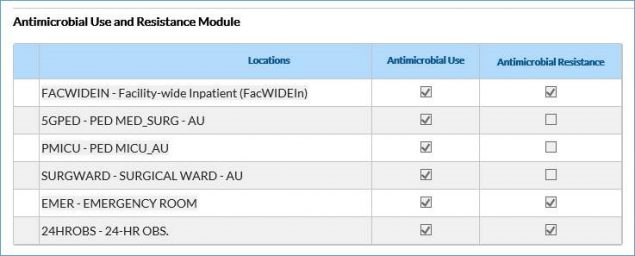
Example selections for AU monthly reporting plan

Note: You do not have to check the AR boxes unless you also plan to submit AR Option data.

Setting up a monthly reporting plan once does not automatically carry over the plan month to month. You must create a reporting plan for every month you intend to report AU Option data. If your monthly reporting plan for AU will not change from the prior month, select the “Copy from Previous Month” option when creating the new month’s reporting plan to save time, as shown in the screenshot below. 

Add monthly reporting plan

Yes, the AU Option requires a monthly reporting plan with AU reporting indicated for every month you plan to submit AU data. You cannot enter AU data “off plan.” See question #1 in this section for how to set up a monthly reporting plan. 

  • Non-FacWideIN locations can be the only location in the AU section of the monthly reporting plan. 
  • To include FacWideIN, you MUST have at least one individual non-FacWideIN location (for example, medical ward, emergency department) in the plan to save the monthly reporting plan. 

Note: The AU and AR Surveillance measures of the Medicare Promoting Interoperability Program is attestation-based so CDC will not share AUR data with CMS, even if included in the monthly reporting plan. 

Locations

NHSN strongly encourages the submission of data from all NHSN-defined inpatient locations (including procedural areas like operating rooms), FacWideIN, and select outpatient acute care settings (specifically, outpatient emergency department [ED], pediatric ED, and 24-hour observation area) from which AU Option numerator and denominator data can be accurately captured. Your facility should not submit data from locations that cannot accurately capture electronic data. Additionally, your facility should exclude these locations’ data from the FacWideIN record.

The AU Option uses the same location mapping guidance as the rest of the NHSN Patient Safety Component. NHSN strongly encourages the submission of AU data from all NHSN-defined inpatient locations (including procedural areas like operating rooms), FacWideIN, and select outpatient acute care settings (specifically, outpatient ED, pediatric ED, and 24-hour observation area) from which the numerator and denominator data can be accurately electronically captured. The AU Option does not accept data from other outpatient locations such as outpatient clinics. 

Facilities may report AU data for more locations than are used for HAI reporting (for example, operating rooms, specialty ward locations like labor and delivery, etc.), so your facility may need to map additional locations within NHSN for AU Option reporting. However, facilities should not map a whole separate set locations for AU reporting (for example, “1 North” and “1 North AUR”). 

Facilities should not make changes to the mapping for existing locations for the purposes of AU Option unless the locations are mapped incorrectly. 

Please review the guidance in CDC Locations and Descriptions and Instructions for Mapping Patient Care Locations [PDF – 1 MB] and work with your Infection Control/Infection Prevention team to determine the correct mapping for each location. If you need help following the guidance in the CDC Locations and Descriptions and Instructions for Mapping Patient Care Locations, please create an NHSN Help Desk ticket with “Locations assistance” in the subject line. 

You will not be able to save your monthly reporting plan with only FacWideIN and no other locations selected for the AU Option (see question #3 in the Monthly Reporting Plan section). Adding a location to the monthly reporting plan without submitting data from it each month will produce missing data alerts on the NHSN Alerts page. 

Further, NHSN recommends uploading location-specific AU CDA files for all inpatient and eligible outpatient units. When FacWideIN data are uploaded into NHSN, they represent aggregate data for all the inpatient locations reported by each facility and NHSN doesn’t have the ability to tease apart the data to separate it into specific locations. Your facility will be limited in the AUR Module features and Analysis Reports you can use by submitting only FacWideIN data. The SAARs are risk-adjusted using location-level information, so you will be unable to generate SAARs or use the Targeted Assessment for Antimicrobial Stewardship (TAS) reports and dashboards when submitting only FacWideIN data.

No. For AU data submission, your facility should only include inpatient locations with electronically captured numerator (antimicrobial days) and denominator (days present and admissions) data in the FacWideIN record. Your facility should not include outpatient locations such as ED, pediatric ED, and 24-hour observation area in the FacWideIN record. 

Your facility should include antimicrobials administered to all patients  physically residing in an inpatient location at any time during a given month in the location-specific and FacWideIN CDA files, regardless of patient status (inpatient, outpatient, observation, etc.). While  NHSN considers the 24-hour observation area location an outpatient location, not all facilities designate a separate physical location for observation patients. If your facility has a 24-hour observation area mapped in its NHSN Location Manager, you should not include antimicrobials administered to patients physically residing in the 24-hour observation area in the FacWideIN record. However, if your facility does not have a separate unit for observation patients, you may include their antimicrobial administrations in the inpatient location-specific and FacWideIN CDA files for the location in which they physically reside, regardless of patient status (inpatient, outpatient, observation, etc.). 

You can include IRF and/or IPF AU data for IRFs/IPFs mapped as locations within your facility in NHSN. Your facility can also include the IRF/IPF location in your facility’s FacWideIN record. If your facility mapped the IRF/IPF as an NHSN location, you can add it to the AUR section of the monthly reporting plan regardless of whether it has a separate CMS Certification Number (CCN) from your hospital. 

If your facility enrolled the IRF/IPF as a separate facility in NHSN (i.e., using a different orgID), you cannot report its AU data with the acute care hospital, but you can report it under the separate NHSN facility. The AU Option accepts data from an IRF or IPF enrolled in NHSN as its own facility using the rehabilitation hospital or psychiatric hospital designations, respectively. The AU data submission process for these hospital designations is no different than a general acute care hospital. 

Antimicrobial Days

No. The AU Option only accepts four routes of administration: intravenous (IV), intramuscular (IM), digestive, and respiratory. Your facility should exclude any other routes of administration (for example, topical, antibiotic locks, intracavity, intrapleural, intraperitoneal, intraventricular, ophthalmic, otic, or irrigation) from AU Option reporting, including total antimicrobial days and sub-stratification of the routes of administration. Please refer to the spreadsheet titled SNOMED AU Routes of Administration within the AU CDA Toolkit for the complete list of eligible SNOMED codes and check with your vendor to make sure they only include the four routes listed above in your total antimicrobial days count.

The AU Option considers each antimicrobial separately. If a patient receives two different antimicrobials (for example, meropenem and amikacin) in the same calendar day, that patient contributes one meropenem antimicrobial day and one amikacin antimicrobial day to the location where the provider administered the antimicrobials.

See Appendix C of the AUR Module Protocol [PDF – 1 MB] for additional examples.

If a patient is on a single antimicrobial (for example, ciprofloxacin) and the provider administers one dose in the morning via IV and another dose in the evening PO, that patient contributes one IV ciprofloxacin antimicrobial day and one digestive ciprofloxacin antimicrobial day. Because a single patient cannot contribute more than one antimicrobial day to the total antimicrobial days for each antimicrobial in a single calendar day, the patient only contributes one total ciprofloxacin antimicrobial day for each location.

See Appendix C of the AUR Module Protocol [PDF – 1 MB] for additional examples.

This counts as one vancomycin antimicrobial day because, even in the case of renal impairment, the AU Option only counts antimicrobials on the day of administration.

The sum of antimicrobial days across individual locations will always be greater than antimicrobial days for FacWideIN. This is because multiple administrations of the same antimicrobial in separate patient care locations within a single calendar day account for one antimicrobial day within  each  location but only one antimicrobial day for FacWideIN. For example, if a patient received one dose of vancomycin in the medical ward and then transferred to the medical intensive care unit (ICU), where they received another dose of vancomycin on the same day, this patient contributes one antimicrobial day for vancomycin to the medical ward and one antimicrobial day for vancomycin to the medical ICU but only one antimicrobial day for vancomycin to FacWideIN. Patients may only contribute one antimicrobial day to each location (including FacWideIN) per day.

The sum of the four routes of administration for a given antimicrobial should always be greater than or equal to the antimicrobial’s total antimicrobial days. In cases where a provider administered the same antimicrobial more than once per day via multiple routes, the sum of the routes can be greater than the total antimicrobial days for that antimicrobial.

Keep in mind that the total antimicrobial days for a given antimicrobial should only include administrations via one of the four routes accepted into the AU Option (IV, IM, digestive, and respiratory). Your facility should exclude administrations via any other routes (see question #1 in this section for examples) from  all  AU Option data. Check with your vendor to make sure they only include the four routes listed above in your total antimicrobial days count.

No. Your facility should not include incomplete antimicrobial administrations (for example, partial infusions) nor antimicrobials that were ordered but not administered. Your facility should only include completed administrations in AU Option data.

Days Present & Admissions

No. The days present denominator is different from the patient days denominator. Days present are the number of patients present at any time on a given calendar day in each patient care location. Patient days are the number of patients present in each patient care location during the once daily census count.

For example, as highlighted in the screenshot below, Patient A was admitted to the medical ICU at 00:01. They were transferred to the medical ward at 08:31. They stayed in the medical ward until they were discharged from the hospital at 24:00. Patient A would contribute one day present to the medical ICU and one day present to the medical ward because they were in each location at some point during that calendar day. Patient A would contribute one patient day to the medical ward because they were present in the medical ward during the census at midnight. They do not contribute a patient day to the medical ICU because they were not present in the medical ICU at midnight during the once daily census.

Note: the NHSN AU Option only counts a patient once for each location each day. For a given location or FacWideIN, the days present count should almost always be higher than the patient days count because days present take patient transfers and discharges into account while patient days do not.

No. For a given location or FacWideIN, the days present count will almost always be higher than the patient days count because days present take patient transfers and discharges into account while patient days do not. For most facilities (90%), among all NHSN AU Option reporting hospitals, the difference between days present and patient days remains within 42% for all inpatient locations (FacWideIN). There is some variation based on the location type. The percent difference is generally smaller in locations with longer lengths of stay and larger in locations with shorter lengths of stay. The table below provides the 90th percentile of percent differences between days present and patient days for select location types and the interpretation for all AU Option reporting facilities. NHSN calculated the percent difference with the following formula: 

Percent Difference=Days Present-Patient DaysDays Present × 100
 
NHSN-calculated percent difference between days present and patient days using nationally reported AU and healthcare-associated infection (HAI) data for 2024 

NHSN-calculated percent difference between days present and patient days using nationally reported AU and healthcare-associated infection (HAI) data for 2024
Location Type  90th Percentile of

Percent Differences 

Interpretation 
FacWideIN  42%  Most facilities (90%) had a difference of <42%. 
Adult ICUs  35%  Most facilities (90%) had a difference of <35%. 
Adult Wards  37%  Most facilities (90%) had a difference of <37%. 
Pediatric ICUs  39%  Most facilities (90%) had a difference of <39%. 
Pediatric Wards  49%  Most facilities (90%) had a difference of <49%. 
Neonatal ICUs  18%  Most facilities (90%) had a difference of <18%. 
Neonatal Step-Down Unit  44%  Most facilities (90%) had a difference of <44%. 
Well Baby Nursery (Level I)  46%  Most facilities (90%) had a difference of <46%. 
Labor, Delivery,

Postpartum Units 

72%  Most facilities (90%) had a difference of <72%. 
Outpatient Locations
(ED, Pediatric ED, 24-Hour Observation Locations) 
70%  Most facilities (90%) had a difference of <70%. 

NHSN recommends validating your days present denominators for AU using the methodology starting on page 12 in the AU Option Implementation Data Validation protocol [PDF – 1 MB] to ensure your vendor system aggregates them correctly, as they can influence your SAAR calculations.

The patient contributes one day present to the FacWideIN record. The NHSN AU Option only counts a patient once per calendar day for the FacWideIN record.

Admissions are defined as the aggregate number of patients admitted to an inpatient location within the facility (FacWideIN) starting on the first day of each calendar month through the last day of the calendar month. A patient is counted as an admission when they arrive in an NHSN designated inpatient location regardless of patient status (for example, inpatient, observation). A patient admitted to an inpatient location is counted as an admission even if they are discharged that same calendar day. If in the ADT system a patient appears to move from an inpatient to an outpatient ED, pediatric ED, or 24-hour observation location then back to an inpatient location, it should be counted as two separate admissions.

Note: the admissions definition used in the AUR Module is different than the definition used for the NHSN Multidrug-Resistant Organism (MDRO)/Clostridioides difficile  Infection (CDI) Module.

The day a patient enters the door to a facility or location is the date of their admission to that facility/location regardless of patient status (for example, inpatient, observation). If the patient remains in an inpatient location and the facility does not discharge the patient, then that stay is all part of the same admission, no matter how long. A stay that continues across multiple calendar months, assuming the patient remains in an inpatient location the entire stay, is still only one admission counted in the month the patient was originally admitted.

If the patient is discharged and then returns on a separate calendar day, then count the patient as a new admission with a new admission date. If the hospital discharges or transfers a patient to a different facility and then that patient returns later, then the vendor system should count that patient as a new admission.

Data Import

No. Though some NHSN Modules allow for both CDA import and manual data entry by hand, the AU Option only accepts data via CDA import due to the amount of data submitted each month. Please review the Uploading CDA Files into NHSN Quick Learn video [Video – 12 min] for additional details.

An Object Identifier (OID) is a unique identifier for your NHSN facility. The AU Option uses the OID in CDA files to identify which facility submitted the files. If your facility submits data to other NHSN Modules via CDA import, you may already have an OID. 

To verify if your facility has or needs an OID, users with administrative rights can navigate through the NHSN application following the steps below: 

  • Navigate to Facility then Facility Info on the left-hand menu. 
  • On the Edit Facility Information page, you’ll find the OID section on the top right of the screen (see screenshot below). 


If you’ve verified that your facility does not have an OID, follow the steps outlined here to obtain one: Object Identifier (OID) Entry Procedure  [PDF – 30 KB].

Yes, you can submit AU and AR CDA files together in the same zip file. For manual upload, all the CDA files in a zip file must be from one facility. For DIRECT submission, the zip file can contain CDA files for multiple facilities. For both manual and DIRECT submission, the zip file can contain up to 1,000 CDA files or a maximum of 2 MB, whichever comes first. Keep in mind, the larger the zip file, the longer it takes to upload when manually logged into NHSN. 

Note: NHSN only accepts alphanumeric characters, hyphens, and underscores in CDA and zip file names. NHSN does not accept other special characters. 

Yes, all required antimicrobials for the reporting calendar year must be included in the AU Option CDA files, regardless of whether your facility used all of them that month.  Appendix B of the AUR Protocol  [PDF – 1 MB] lists the required antimicrobials for the reporting calendar year. See question #5 in this section for how to report required antimicrobials that were not administered during a calendar month.

A whole number greater than or equal to 0 or “NA” must be reported for  every  antimicrobial listed in Appendix B of the AUR Protocol [PDF – 1 MB], regardless of actual administration in your facility/location in each month. 

  • Zero (0) – Use when your facility can electronically capture administrations of the antimicrobial in the eMAR/BCMA but did not administer it to any patients during the given month. 
    • Example: If your system can electronically capture amoxicillin via eMAR/BCMA but no providers administered it to patients during the month, the total antimicrobial days count for amoxicillin should be 0. 
    • The CDA file expresses this as value=”0”. 
  • Not applicable (NA) – Use when your facility cannot electronically capture administrations of the antimicrobial. 
    • Example: If a provider gives amikacin via respiratory route to patients throughout the month, but the eMAR/BCMA cannot accurately capture the administrations, the antimicrobial day respiratory count for amikacin should be ”NA”. 
    • Facilities should only use “NA” for non-formulary agents when those agents, if administered, cannot be accurately electronically captured. If use of non-formulary agents can be accurately electronically captured, no use of those agents in each location/month should be reported as “0” (zero). 
    • The CDA file expresses this as nullFlavor=”NA” but the NHSN AU Option reports display NA as “.”. 

In NHSN, after selecting Import/Export on the navigation bar, you should see “AUR Summary Data” or “Events, Summary Data, Procedures Denominators” as an option to upload CDA files [Video – 12 min]. Both options allow you to upload AU data into NHSN. If you do not see either of these options, a user with administrative rights must change your user rights. See the NHSN AUR User Rights  [PDF – 350 KB] document for more information.

Sometimes, when uploading multiple AU files together, some files successfully upload and others do not. Here is a screenshot of what it looks like when you submit files together and some records pass but others fail.  

Note: both the Error Report and Submit buttons are enabled: 

Import events, procedures and/or summary data


If you click on the Summary Data tab in the Validation Results table, you can see the files that passed and failed validation by looking in the Status column. In this instance, the user submitted two recordsone passed validation and one failed. When you click Submit, only the file that successfully passed validation uploads to NHSN. Clicking Submit generates a PDF report, which shows the files that successfully imported and the files that did not pass validation and did not import. 
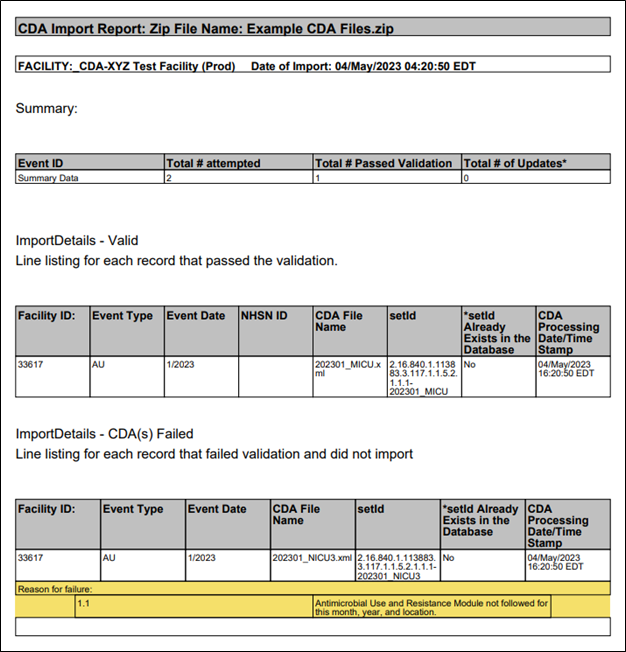
 

Please view and save the PDF report for your records each time you import data into the AU Option. The PDF report shows which files passed validation and which files failed. For each file that failed, the reasons for failure are included in the section below the record information. The NHSN Help Desk requires information from the PDF report to assist you with inquiries related to data import errors. 

We highly recommend you open and save the PDF report generated during manual upload to NHSN. This PDF provides the date of upload along with the list of records that successfully uploaded and those that failed to upload. If any files failed to upload, the PDF also shows the error messages associated with that failing file.  

We have a helpful training session titled “Common Antimicrobial Use and Antimicrobial Resistance Option Upload Errors” in the Additional Trainings section on the AUR Training page. This session goes into more detail about interpreting the PDF report as well as common errors. If you need additional help reading the PDF report, please send it to NHSNCDA@cdc.gov for assistance.  

Newly uploaded data do not appear in the NHSN analysis outputs until you generate new data sets within NHSN. Your data set is a snapshot of the data currently in your NHSN facility during the time period specified when you click the “Generate Reporting Data Sets” button. Always generate new data sets after uploading data into NHSN. See the Generating Datasets Guide [PDF – 432 KB] for more information. 

Note: Each NHSN user has their own data sets. You may not see the same data as your coworkers if you generated data sets at different times or with different parameters. 

You can view AU Option data using the NHSN Analysis function. You can find details on AU Option analysis in the NHSN AUR Module Protocol  [PDF – 1 MB] or in the Antimicrobial Use and Resistance Module Reports section of the Patient Safety Analysis Quick Reference Guides webpage. 

NHSN provides short analysis quick reference guides to assist with viewing, modifying, and interpreting AU Option data: 

SAARs 

Rate Table 

Other Report Types 

You must generate data sets within NHSN after uploading new data to run analysis reports with the most current data. See question #9 in this section for more information about generating data sets. 

Import Errors

The NHSN AU Option requires users to upload CDA files in a zip file. Try zipping the files and resubmitting. Note that each zip file can contain up to 1,000 CDA files or a maximum of 2 MB, whichever comes first. 

This error message means that you did not add the month, year, and location in the CDA file you’re trying to upload in the Antimicrobial Use and Resistance portion of your monthly reporting plan. You must add the locations to the Antimicrobial Use and Resistance portion of your monthly reporting plan for every month you plan to submit AU data. NHSN will not accept out-of-plan data. To edit your monthly reporting plan to include AU, follow the steps in question #1 in the Monthly Reporting Plan section. After you edit your monthly reporting plan to include AU for the desired month, year, and location, NHSN should accept the CDA file.

If you verified that this location is on your monthly reporting plan and NHSN still does not accept the file, then incorrect location information in your CDA file may be causing the error. See question #3 in this section for details on location errors.

The location in the CDA file must be the exact match to the NHSN “Your Code” value, “NHSN HL7 code” and location type values in the NHSN Location Manager (see screenshot below). This error message is telling you that the location name used in your CDA file does not match a location currently mapped in your NHSN facility. 

We recommend meeting with your NHSN Facility Administrator to have them export the location list out of NHSN (Facility > Locations > Export Location List) so you can compare what’s in NHSN to what’s in your vendor system. Decide the best way to rectify the differences (update NHSN or update the vendor software) with your Infection Control/Infection Prevention department. Once you’ve matched the locations across both systems, re-export your AU CDA files and import them into NHSN. 
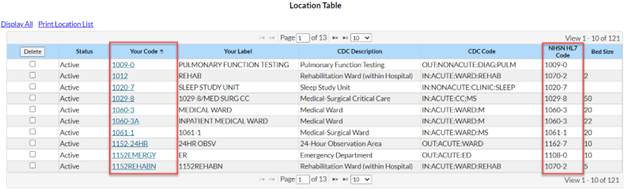
Location tables


Each year, NHSN reviews the required antimicrobials to add newly FDA approved drugs and remove drugs that are no longer commercially available. If your AU CDA file contains a drug that should be removed (specifically, not reported), you’ll see an error that says “Drug code (insert RxNorm drug code) is invalid. Please correct.” This error most often occurs when facilities are submitting AU data for the first few months of a calendar year, before their software vendors have had the time to apply the new rules. Work with your vendor to update your files and try to upload again.  

Each year NHSN reviews the required antimicrobials to add newly FDA approved drugs and remove drugs that are no longer commercially available. If your AU CDA file is missing a drug that should be includedyou’ll see an error that says “(insert drug name) is a required drug. Please work with your vendor to add this drug to your AU files.” This error most often occurs when facilities are submitting AU data for the first few months of a calendar year, before their software vendors have had the time to apply the new rules. Work with your vendor to update your files and try to upload again.  

This error message indicates that you are uploading a CDA file that was previously uploaded into NHSN with that same setID (unique identifier for a CDA file). If you are trying to update an existing record in NHSN with new information, first try re-exporting the files from your vendor software to update the version number. If, after re-exporting the files from your vendor software, you’re still getting that error during upload, you’ll need to manually delete the existing record first. Follow the steps in Q9 in the General Submission section to manually delete the months. Once you’ve deleted the records, try to upload again.  

Hospitals submitting data to the AU Option are required to use vendor software that has completed Synthetic Data Set (SDS) Validation with NHSN. This error means your AU CDA files do not contain an updated SDS validation ID. This validation ID is provided to a software vendor after they successfully complete the SDS Validation process. Work with your vendor to determine when they’ll complete the SDS Validation process and be able to update that value in your AU CDA files.  

This error message means that the facility OID in your CDA file does not match the one listed for your facility in NHSN or is invalid. PHINTECH assigns each facility a unique OID, which is used by the AU Option in CDA files to identify which facility submitted the files. Every NHSN facility has its own distinct OID. 

To resolve this issue, work with your vendor representative to ensure the correct OID is included in your CDA files. For instructions on finding your facility’s OID in NHSN, see question #2 in the Data Import section. 

There are a few reasons the “Rhapsody error” message appears. In all cases, we recommend waiting a few hours or trying the next day to complete your upload. If the original error was generated because of internal NHSN issues, the files should upload when you try again the following day. If the original error was due to an issue in your files, you’ll continue to see the “Rhapsody error” when you try to upload them. In this case, please send your file to NHSNCDA@cdc.gov for further investigation. 

In most cases, this error indicates the file has one or more drugs listed more than once in the file. For example, an entry for amikacin is listed two times in the file instead of just once. Ask your vendor to review the file and remove any duplicate drug entries. Once the file has been updated, try the upload again. If you’re still getting the error, send the file to NHSNCDA@cdc.gov for further investigation.